Sell digital productswith one link.
Add a product, have it approved, and share its checkout page anywhere. Buyers pay by card or PayPal and get their receipt — no store to build and no payment account to open.
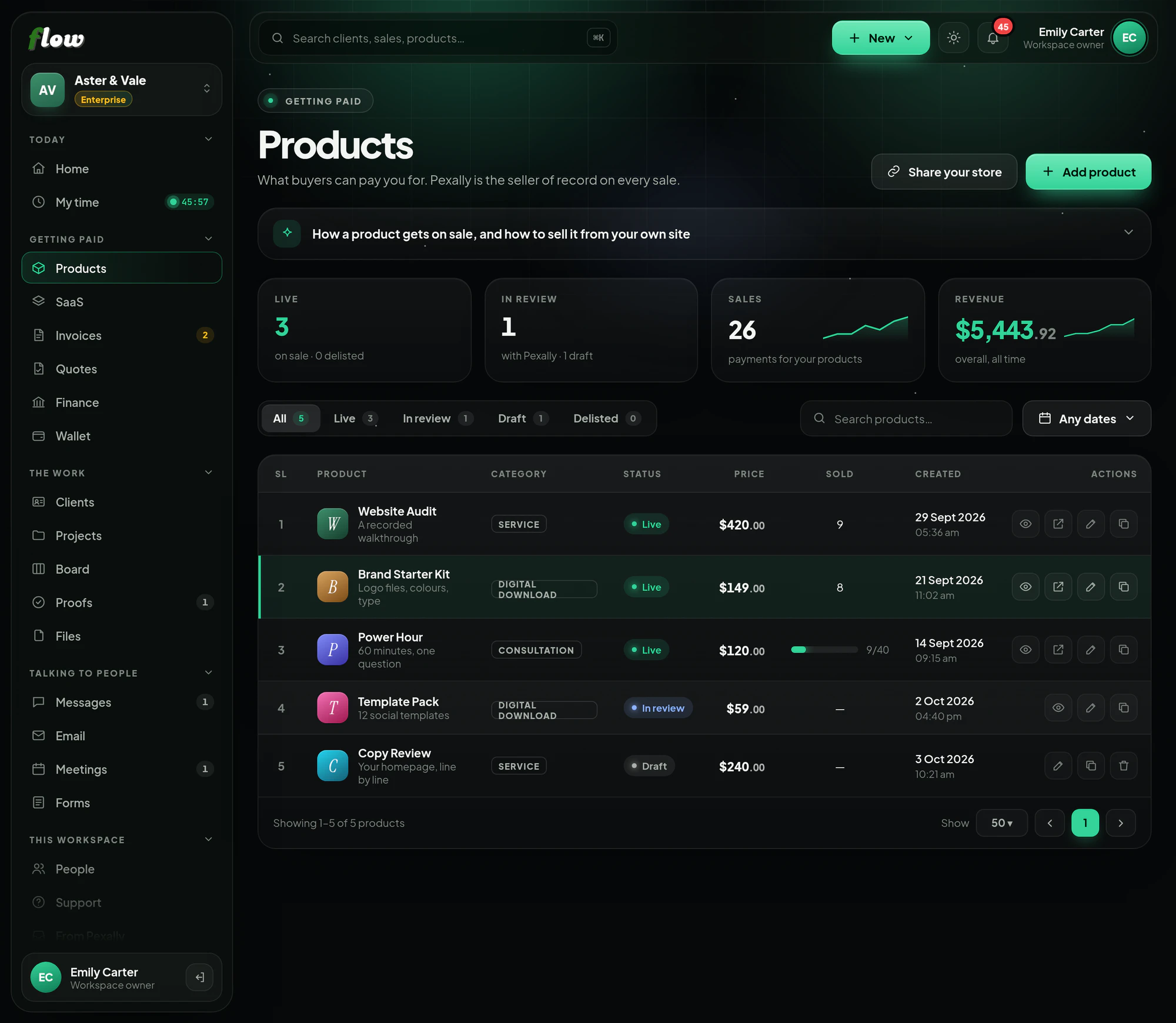
Products, step by step.
Sell digital products with a Pexally checkout. These are the same steps you will see inside Flow, in the guide at the top of Products.
- 01Write itAdd the product, its price in US dollars, what kind it is (a download, a service, a retainer, a consultation, a licence or a membership) and what the buyer gets. Digital products and services only — nothing is shipped.
- 02Choose what happens after paymentOptionally, a page on your own site to send buyers to once they have paid (Send buyers here afterwards). Add discount codes buyers can enter at checkout.
- 03Submit it for reviewIt stays a draft, visible only to your workspace, until you submit it. Pexally is the legal seller on every sale, so staff check the listing and set it live — and again if a live listing is changed.
- 04Copy its checkout linkA live product has its own secure checkout page. Copy the link from the product's row.
- 05Put it wherever your buyers areA button on your website, a link in your bio, an email, a message. Buyers pay by card or PayPal — see Connect your website below for each way to do it.
- 06Every sale lands in FinanceWith the buyer added to Clients, the evidence that answers a dispute kept, and your share on its way to your Wallet.
Connect Products to your own site or app.
From a link anybody can paste, to a full connection your developer can build in an afternoon. The same guide is inside Flow, at the top of the module.
Connect your website or store to Flow
Four ways, from a link anyone can paste to a full connection for developers. Start with the first; add the others when you need them.
1Share the checkout linkEvery planThe quickest way: no code, no plugin, nothing to install.
- 1Copy the linkIn Products, find the live product and press the copy button on its row (Copy the checkout link).
- 2Paste it anywhereYour Instagram or TikTok bio, a WhatsApp or Messenger chat, an email, a PDF, a QR code on a slide. Whoever opens it sees your product and pays on Pexally's secure checkout.
- 3Watch it sellEach payment appears in Finance straight away, and the buyer in Clients.
2Add a Buy button to your websiteEvery planA button on your own site that opens the checkout. Works on WordPress, Shopify, Wix, Squarespace, Webflow or plain HTML.
- 1Use your website builder's own buttonEvery builder has a Button block. Set its link to your product's checkout link. WordPress: a Buttons block. Shopify: a button in a section, or a link in your menu. Wix: a Button, linked to a Web address. Squarespace: a Button block. Webflow: a Button element with the URL.
- 2Or paste this HTMLWhere your builder accepts custom HTML (WordPress: Custom HTML block; Shopify: Custom Liquid section), paste this and put your link in href.
HTML — a Buy now button <a href="https://pay.pexally.com/your-workspace/your-product" style="display:inline-block;padding:14px 28px;border-radius:999px; background:#29741d;color:#fff;font:600 16px/1 system-ui; text-decoration:none"> Buy now </a> - 3Test itOpen your page, press the button, and check the checkout shows the right product and price.
3Bring buyers back to your site, and know who boughtEvery planSend each buyer to your own thank-you page, and tie every sale to your own records.
- 1Set a thank-you pageEdit the product and fill in Send buyers here afterwards with an https:// address — your download page, a welcome page, a calendar. Buyers go there once the payment succeeds.
- 2Tag the link with your own referenceAdd ?ref= and your own identifier to the checkout link — a campaign name, an order number, a user id. It is kept on the sale, so you can match it against your own system.
Link with your reference https://pay.pexally.com/your-workspace/your-product?ref=summer-launch
4Connect your store or app by APIEnterpriseFor developers: make checkout links from your own server, and let Pexally tell your system the moment a sale happens, so you can deliver automatically.
- 1Create an API keyOpen Developers in the sidebar, name a key after the server that will use it and press Create a key. Copy it — it is shown once. Keep it on your server as an environment variable, never in a browser or an app.
.env on your server PEXALLY_API_KEY=pxf_…your key… - 2Check it works: list your productsA 200 with your catalog means the key is good. Each product's id is what you will use next.
Terminal curl https://flow.pexally.com/api/v1/products \ -H "Authorization: Bearer $PEXALLY_API_KEY" - 3Add a webhookStill on Developers, under Webhooks, give an https address on your server and copy the signing secret it shows you, once.
.env on your server PEXALLY_WEBHOOK_SECRET=whsec_…your secret… - 4Send a buyer to payWhen somebody presses your buy button, make a checkout link on your server and redirect them to it. Pass your own id for them as ref — it comes back on the order and every webhook.
Node.js — your buy button's route app.post("/buy", async (req, res) => { const response = await fetch("https://flow.pexally.com/api/v1/checkout-links", { method: "POST", headers: { Authorization: `Bearer ${process.env.PEXALLY_API_KEY}`, "Content-Type": "application/json", "Idempotency-Key": `cart_${req.body.cartId}`, // a retry returns the same link }, body: JSON.stringify({ product_id: "3f6c…", // from GET /products ref: req.user.id, // your id for this buyer customer_email: req.user.email, success_url: "https://yourstore.com/thank-you", }), }); const link = await response.json(); if (!response.ok) return res.status(502).send(link.error.message); res.redirect(303, link.url); // Pexally's secure checkout }); - 5Deliver when order.paid arrivesCheck the signature, answer 200 straight away, then read the order and give the buyer what they paid for. order.refunded tells you when to take it back.
Node.js — your webhook route import crypto from "node:crypto"; import express from "express"; app.post("/webhooks/pexally", express.raw({ type: "application/json" }), async (req, res) => { // 1. Is it really from Pexally, and recent? const timestamp = req.get("Pexally-Timestamp"); const expected = "v1=" + crypto .createHmac("sha256", process.env.PEXALLY_WEBHOOK_SECRET) .update(`${timestamp}.${req.body}`) .digest("hex"); const presented = req.get("Pexally-Signature") ?? ""; const fresh = Math.abs(Date.now() / 1000 - Number(timestamp)) < 300; if (!fresh || presented.length !== expected.length || !crypto.timingSafeEqual(Buffer.from(presented), Buffer.from(expected))) { return res.sendStatus(400); } // 2. Answer at once, then do the work — a slow answer gets a retry. res.sendStatus(200); // 3. Handle each event once: deliveries can repeat. const event = JSON.parse(req.body); if (await alreadyHandled(event.id)) return; if (event.type === "order.paid") { const order = await fetch(`https://flow.pexally.com/api/v1/orders/${event.ref}`, { headers: { Authorization: `Bearer ${process.env.PEXALLY_API_KEY}` }, }).then((r) => r.json()); await deliver(event.ref, order); // your code: email the file, unlock the course… } if (event.type === "order.refunded") await revoke(event.ref); }); - 6Try it end to endThere is no separate test mode. Make a low-priced product, buy it through your own button, watch the webhook arrive, then refund it from Finance — the refund arrives as order.refunded, which tests that path too.
The full API reference, every endpoint and every webhook, is in the developer docs.
What makes Products different.
- Six kinds of productDigital downloads, services, retainers, consultations, software licences and memberships.
- Sell from anywhereOne checkout link per product, for your site, your socials or a message.
- Discount codesBuyers can enter a code at checkout.
- Proof of deliveryEvery sale keeps the evidence that answers a dispute.
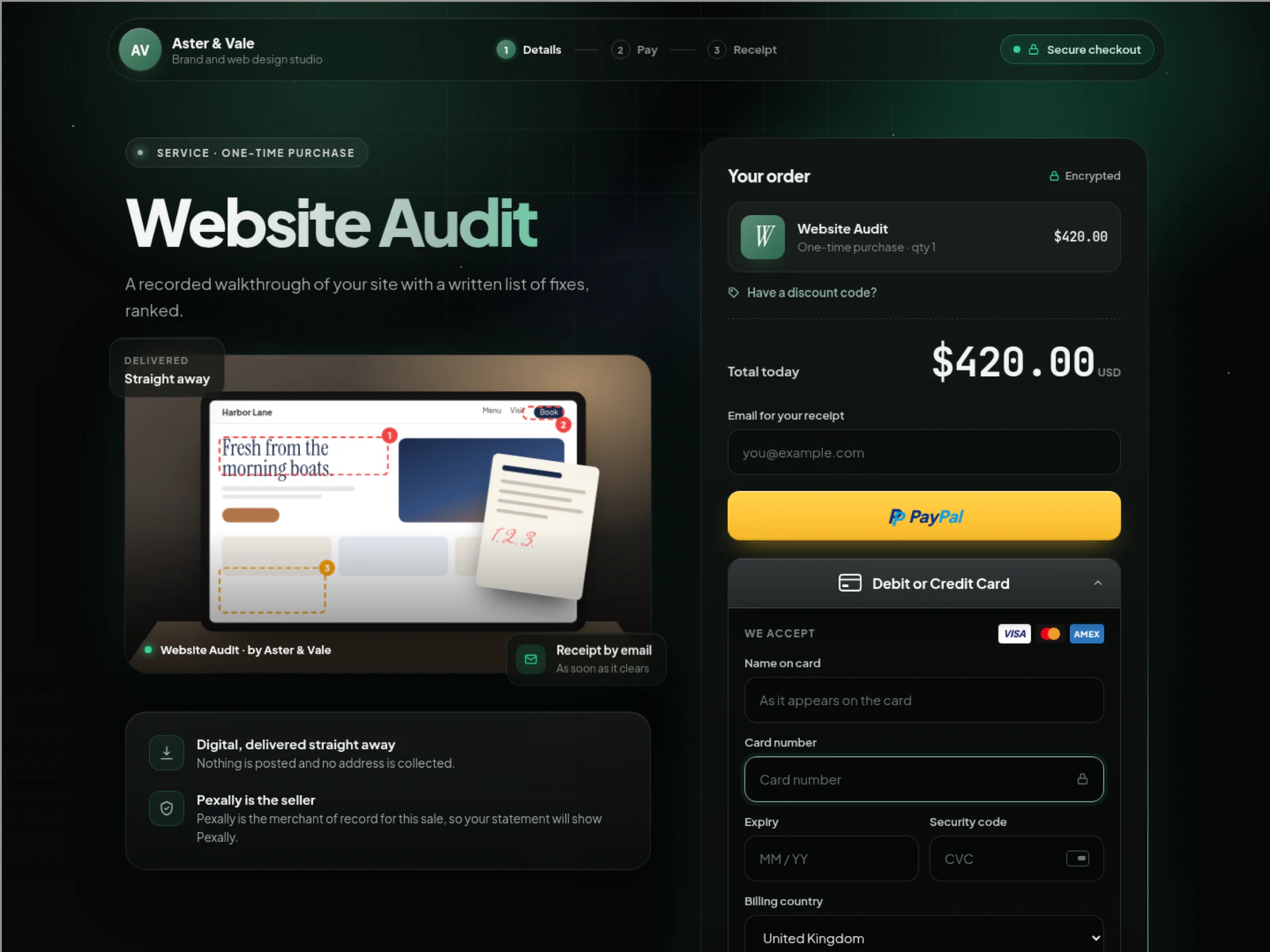
The checkout page your buyers see
Your name on it, card or PayPal to pay, and Pexally as the seller behind every payment — on a page that works on any phone.
About Products.
Why is my product reviewed?
Pexally is the seller of record on every sale, so a person checks each listing before it goes on sale — and again if a live listing is changed.
Can I sell physical products?
No. Flow is for digital products and services only, and buyers are never asked for a shipping address.