Sell subscriptions,renewals run themselves.
Build a pricing page with as many plans as you like, share one link, and Flow charges every renewal at the price each subscriber signed up on.
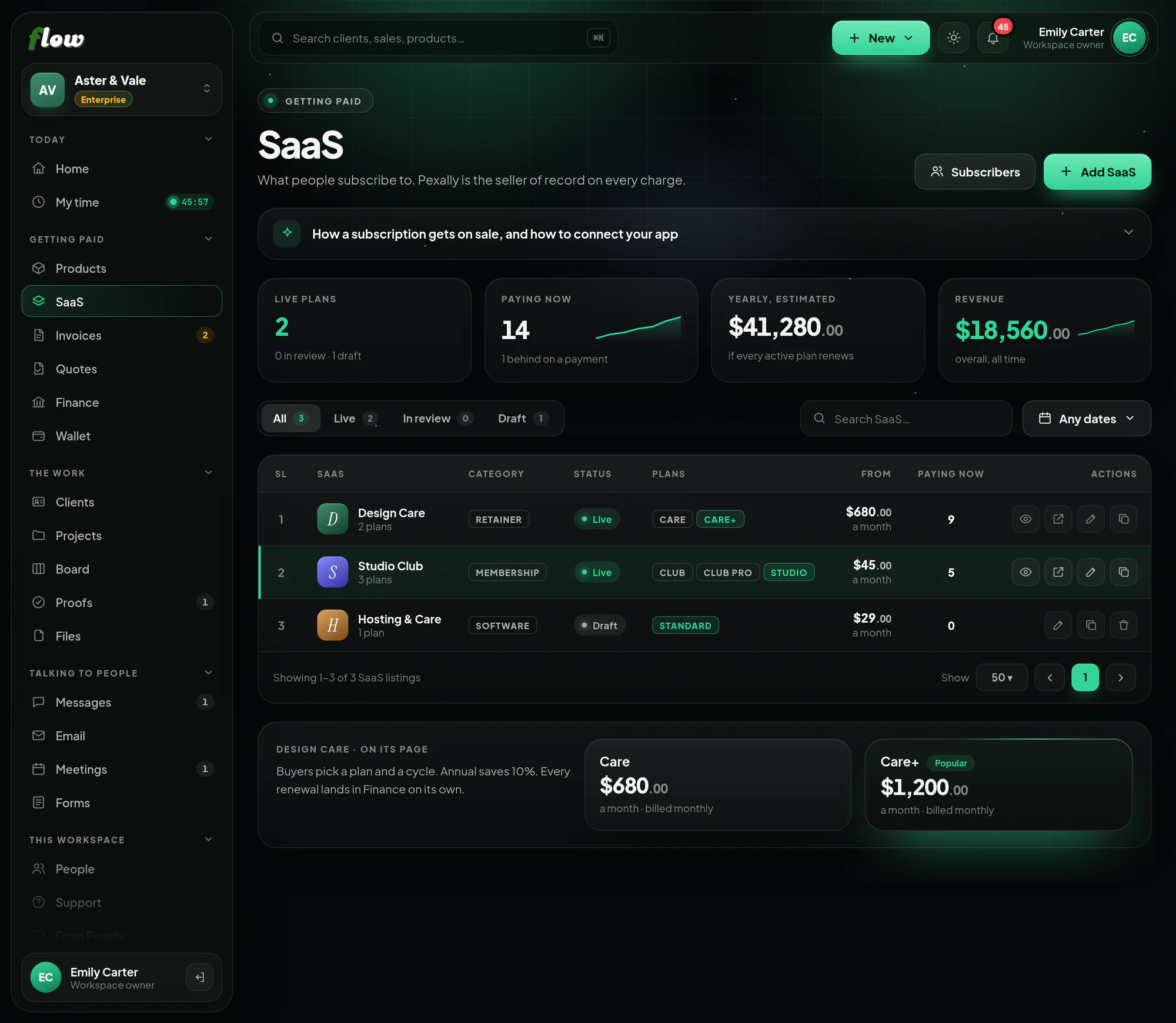
SaaS, step by step.
Sell repeating plans, and manage the people subscribed to them. These are the same steps you will see inside Flow, in the guide at the top of SaaS.
- 01Build the pricing pageOne SaaS listing is one pricing page. Give it as many plans as you want — Free, Pro, Premium — each with its price and what it includes, and set the billing cycles once for all of them.
- 02Choose where subscribers landOptionally, the page in your own app to send them to after they pay — your sign-up, your onboarding, a welcome screen.
- 03Submit it for reviewPexally is the legal seller on every charge, so a person reads every listing before it goes on sale. Changing a live listing sends it back for review.
- 04Share the one linkOnce it is live, the whole listing has one address. Buyers pick a plan and a cycle on that page and pay by card or PayPal.
- 05They pay, and they keep payingThe first payment creates a subscriber. Renewals are charged automatically at the price and cycle they signed up on — a later price change never re-bills anybody already on a plan.
- 06Follow your subscribersWho is paying, who is behind, and your estimated yearly revenue, under Subscribers. Every charge also lands in Finance.
- Paid once? That belongs in Products. SaaS is for anything that charges again and again — software, a membership, a retainer, a licence.
Connect SaaS to your own site or app.
From a link anybody can paste, to a full connection your developer can build in an afternoon. The same guide is inside Flow, at the top of the module.
Connect your app to Flow
Start with the link, tell Flow who each subscriber is in your app, and — on Enterprise — let Pexally keep your app's access in step with every payment.
1Put your pricing link in your appEvery planNo code: your Upgrade or Pricing button opens your Pexally pricing page.
- 1Copy the listing's linkIn SaaS, press the copy button on the live listing's row to copy its address.
- 2Point your Upgrade button at itOn your website's pricing page, in your app's settings, in the email you send when a trial ends — anywhere somebody decides to pay.
HTML — an Upgrade button <a href="https://pay.pexally.com/your-workspace/saas/your-listing" style="display:inline-block;padding:14px 28px;border-radius:999px; background:#29741d;color:#fff;font:600 16px/1 system-ui; text-decoration:none"> Upgrade </a>
2Know which of your users subscribedEvery planTie each subscription to the user in your app, and bring them straight back after paying.
- 1Add your user's id to the linkAdd ?ref= and your own id for the person — it is kept on the subscription, so you can see which of your users is paying.
Link from your app, for the signed-in user https://pay.pexally.com/your-workspace/saas/your-listing?ref=user_4821 - 2Send them back to your appEdit the listing and set the page to send subscribers to afterwards — for example https://yourapp.com/billing/done.
- 3Check it on the subscriberOpen the subscriber in Flow and your reference is on it — useful when reconciling against your own system.
3Keep access in step automatically (API and webhooks)EnterpriseFor developers: start subscriptions from your server, and let Pexally tell your app about every start, renewal, failed payment and cancellation, so access switches on and off by itself.
- 1Create an API key and a webhookIn Developers: create a key (shown once) and add a webhook with your https address, copying its signing secret. Keep both on your server only.
.env on your server PEXALLY_API_KEY=pxf_…your key… PEXALLY_WEBHOOK_SECRET=whsec_…your secret… - 2Find your plan's idsList your products: your SaaS listing and each plan come back with their ids and prices.
Terminal curl https://flow.pexally.com/api/v1/products \ -H "Authorization: Bearer $PEXALLY_API_KEY" - 3Start a subscription from your appWhen a signed-in user picks a plan, make a checkout link on your server for that plan and cycle, with their id as ref, and redirect them.
Node.js — your Upgrade route app.post("/upgrade", async (req, res) => { const response = await fetch("https://flow.pexally.com/api/v1/checkout-links", { method: "POST", headers: { Authorization: `Bearer ${process.env.PEXALLY_API_KEY}`, "Content-Type": "application/json", "Idempotency-Key": `upgrade_${req.user.id}_${req.body.planId}`, }, body: JSON.stringify({ product_id: "3f6c…", // your SaaS listing plan_id: req.body.planId, // e.g. Pro interval_months: 12, // one of that plan's cycles ref: req.user.id, // your id for this user customer_email: req.user.email, success_url: "https://yourapp.com/billing/done", }), }); const link = await response.json(); if (!response.ok) return res.status(502).send(link.error.message); res.redirect(303, link.url); }); - 4Switch access on and off from webhookssubscription.started and subscription.renewed: give or extend access. subscription.payment_failed: warn them. subscription.cancelled or subscription.refunded: take access away. On any of them, read the subscription and store its status and current_period_end against the user.
Node.js — your webhook route import crypto from "node:crypto"; import express from "express"; app.post("/webhooks/pexally", express.raw({ type: "application/json" }), async (req, res) => { // 1. Is it really from Pexally, and recent? const timestamp = req.get("Pexally-Timestamp"); const expected = "v1=" + crypto .createHmac("sha256", process.env.PEXALLY_WEBHOOK_SECRET) .update(`${timestamp}.${req.body}`) .digest("hex"); const presented = req.get("Pexally-Signature") ?? ""; const fresh = Math.abs(Date.now() / 1000 - Number(timestamp)) < 300; if (!fresh || presented.length !== expected.length || !crypto.timingSafeEqual(Buffer.from(presented), Buffer.from(expected))) { return res.sendStatus(400); } // 2. Answer at once, then do the work — a slow answer gets a retry. res.sendStatus(200); // 3. Handle each event once: deliveries can repeat. const event = JSON.parse(req.body); if (await alreadyHandled(event.id)) return; if (event.type.startsWith("subscription.")) { const sub = await fetch(`https://flow.pexally.com/api/v1/subscriptions/${event.ref}`, { headers: { Authorization: `Bearer ${process.env.PEXALLY_API_KEY}` }, }).then((r) => r.json()); // Your code: store sub.status and sub.current_period_end on the user, // and let your app check them before opening paid features. await syncAccess(event.ref, sub); } }); - 5Let people cancel from your appA Cancel button in your app can call the API, and the subscription.cancelled webhook that follows updates your records like any other.
Terminal curl -X POST https://flow.pexally.com/api/v1/subscriptions/SUBSCRIPTION_ID/cancel \ -H "Authorization: Bearer $PEXALLY_API_KEY" - 6Try it end to endThere is no separate test mode. Subscribe yourself on a low-priced plan, watch subscription.started arrive, then cancel and refund it from Flow to test those paths too.
The full API reference, every endpoint and every webhook, is in the developer docs.
What makes SaaS different.
- Plans and cyclesAs many plans as you like, billed monthly, yearly or on the cycle you choose.
- Automatic renewalsEvery renewal is charged for you, at the price and cycle each subscriber chose.
- Fair to subscribersA price change never re-bills anybody already on a plan.
- Every subscriberSee who is paying, who is behind, and your estimated yearly revenue.
About SaaS.
What if I change a plan's price?
New subscribers pay the new price. Anybody already on the plan keeps the price they signed up on.
Can I sell memberships or retainers this way?
Yes — any repeating digital product or service, from software to a monthly retainer.